Write the draft

Novel writing software that keeps planning beside the manuscript

Mythwrites gives fiction writers one connected place for the manuscript and the planning around it, so a chapter, a scene idea and the world behind it do not have to live in separate tools.

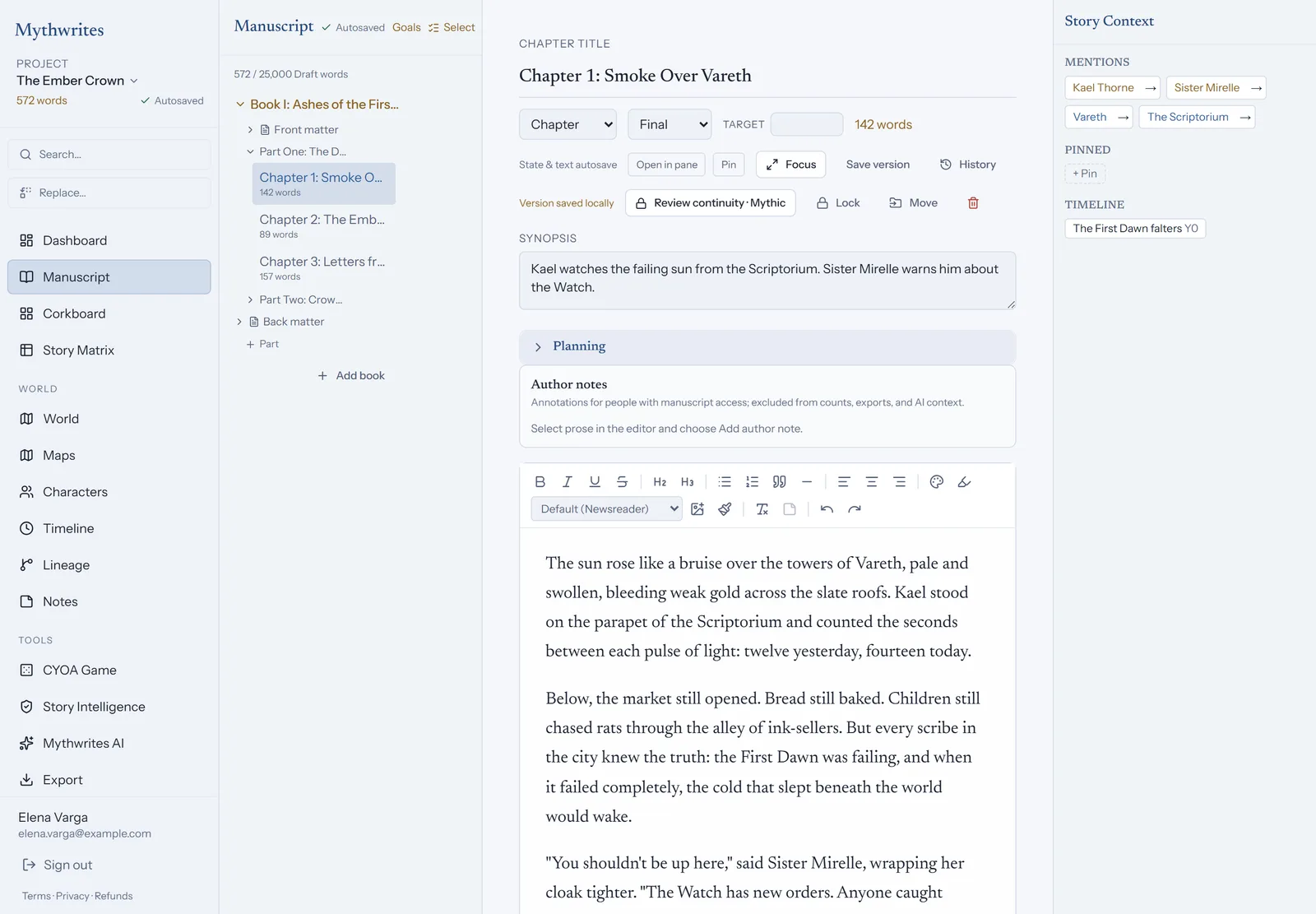
Mythwrites manuscript editor showing Chapter 1 of The Ember Crown open for writing, with book outline on the left and story context panel on the right.
The Mythwrites manuscript workspace: outline on the left, distraction-free prose in the center, and context panel listing mentioned lore on the right.

Book, Part and Chapter structure

Start with a Book, divide it into Parts, and write within Chapters. The hierarchy gives a long project a stable shape while you work through individual scenes.

The rich editor keeps the draft readable and supports the ordinary work of writing: revising prose, tracking word counts and setting daily writing goals.

  • Rich manuscript editing for connected chapters
  • Per-chapter word counts and writing goals
  • A project structure that can grow with a series

Plan with the same chapters

The corkboard and story matrix are views over the same manuscript structure. Use them to see chapter order, planning details and story relationships without creating a second copy of the draft.

That shared source keeps planning useful after the outline changes: the chapter you revise remains the chapter your planning views describe.

Bring work in and take it out

Smart import helps bring existing manuscripts and notes into a Mythwrites project. When you need a copy outside the workspace, export to Markdown, JSON or DOCX.

Full JSON backups give you a portable project copy, so the writing is not trapped in one application.

A writing workspace, not a black box

Mythwrites can surface story intelligence and continuity suggestions, but it does not silently rewrite your manuscript. You remain the author and decide which edits belong in the draft.

Worked Writer Example

Restructuring an 80,000-Word Fantasy Epic

Scenario: You are halfway through your second revision and realize Chapter 12 (the siege of Oakhaven) needs to happen before the party travels through the Whispering Mire in Chapter 9.

The Problem: In ordinary word processors or disconnected tools, rearranging chapters breaks chronology, separates character introductions, and leaves orphaned timeline notes in three different documents.

Seraphina looked back at the smoke rising from Oakhaven's ruined spires...

How Mythwrites Resolves It: In Mythwrites, you drag Chapter 12 on the story matrix or corkboard. The chapter order updates immediately, and every view that reads that order, like Story Intelligence's sense of what has and has not happened yet, follows it. Run a continuity review afterward and it checks your timeline events and character appearances against the new sequence, so you can catch and fix any reference that needs a line edit.